The studio
Looks and Voice
Change how you look and sound on stream — beauty, filters, avatars, worlds and voice effects.
Looks and Voice are in the bar under your preview. Both work before and during a stream, in the browser studio. They are not available in a live event or when you broadcast with OBS.
Looks
Press Looks to open the editor beside your preview. It has three parts:
- Face: ready-made Looks, Retouch (smoother skin, brighter eyes, whiter teeth), Reshape, Makeup, Face paint and colour Filter.
- Avatar: One tap costumes and characters, a whole 3D character that follows your head, arms and mouth, things to Wear, Reactions that answer your face, Colours and Style.
- World: what is behind you, from a blurred room to castles, forests, cities, space and famous paintings, or a picture of your own.
Every change shows on your preview at once. Press Save look to keep it; Cancel or ✕ throws away what you didn't save. The switch at the top turns your look on and off, and Hold to compare shows your camera without it. It all runs on your device: nothing is uploaded.
While you are live, viewers see each change as you make it, so set up your look before you go live.
On a phone
Looks opens as a quick strip under the preview: Beauty, Filters, Effects and Background, one tap each, and Soft, Medium or Full for a filter's strength. More opens the full editor.
Voice
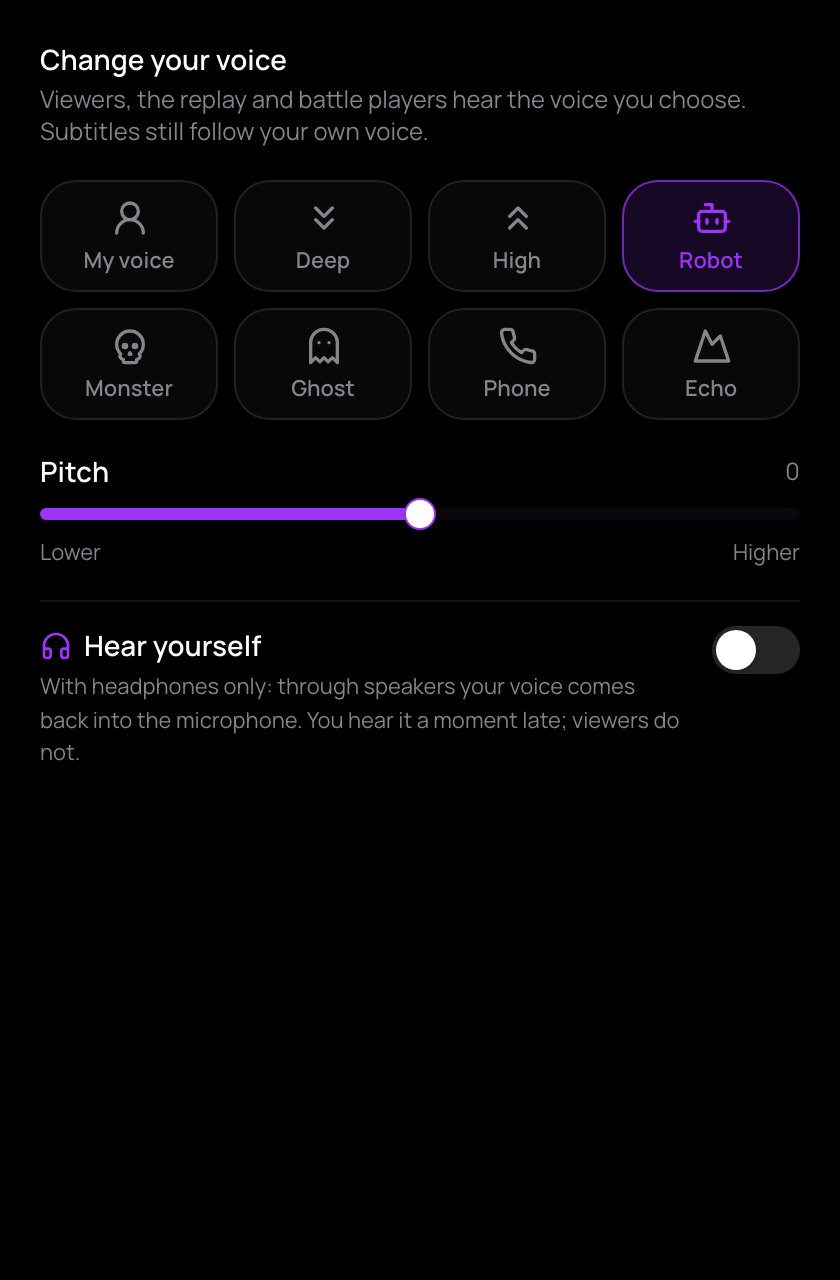
Press Voice and tap a voice: Deep, High, Robot, Monster, Ghost, Phone or Echo. My voice brings back your own.
- Pitch moves any voice, or your own, higher or lower, up to an octave each way. Tap the number above the slider to go back to the voice's own pitch.
- Hear yourself lets you listen to the effect. Use it only with headphones: through speakers, your voice comes back into the microphone.
Viewers, the replay and the other players in a battle hear the voice you choose. A chip on your preview shows which voice is on; tap it to change it. When you open the studio again, it starts with your own voice. Subtitles always follow your real voice.
Some browsers can't change the pitch. The panel then says so, and the voice keeps its other effects.